7 Common Laptop Problems and Solutions
13 Feb 2026, 10:24 PM IST
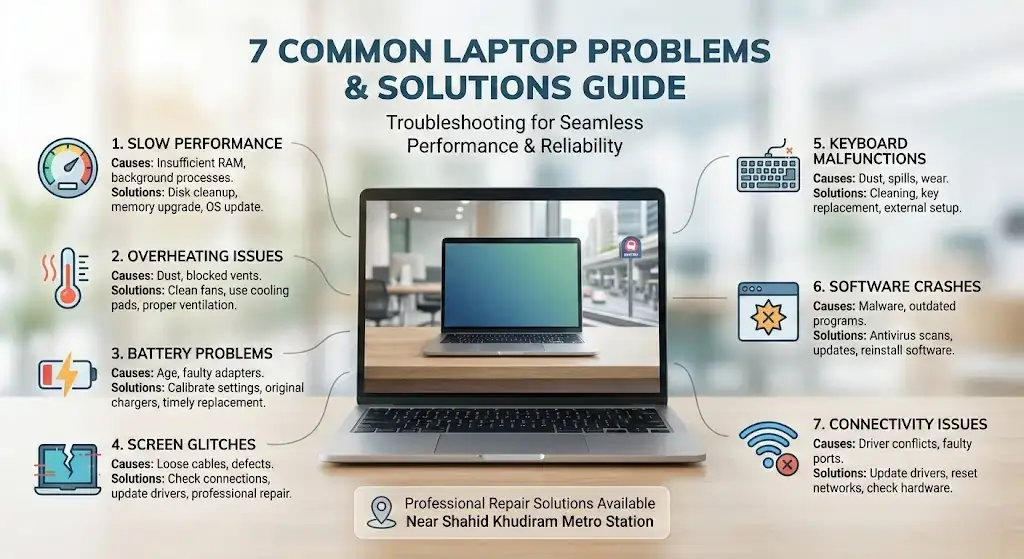
Laptops face frequent technical issues that slow work and productivity. Common problems include slow performance, overheating, battery failure, screen glitches, keyboard malfunctions, software crashes, and connectivity problems. Lap Technology, located near Shahid Khudiram metro station, Kolkata, provides professional laptop repair and accessories solutions to ensure seamless performance and long-lasting reliability.Understanding laptop issues and solutions helps users avoid downtime and costly repairs.
What are the most common laptop problems today?
Most laptops today face issues like slow performance, overheating, battery drain, screen glitches, keyboard faults, software crashes, and Wi-Fi or peripheral connectivity problems. Knowing why these issues occur and how to address them can save time and money. Simple steps often prevent further damage and maintain efficiency.
7 Common Laptop Problems and Solutions
1. Slow Performance
Laptop Troubleshooting Basics
Slow laptops usually result from multiple causes: low RAM, cluttered storage, background processes, or outdated software. Running disk cleanup, uninstalling unnecessary programs, and updating the operating system helps. Adding RAM or replacing an older hard drive with an SSD can restore speed. At Lap Technology, we analyze each laptop’s condition to optimize performance and responsiveness for daily work or study.
2. Overheating Issues
Causes and Solutions
Overheating often stems from dust, blocked vents, or prolonged heavy use. Fans and cooling systems need cleaning, and thermal paste may require replacement. Using a cooling pad and avoiding lap use on soft surfaces can help. Our technicians at Lap Technology inspect cooling mechanisms and provide preventive maintenance to extend device life.
3. Battery Problems
Charging and Replacement
Battery issues, such as rapid drain or failure to charge, usually occur due to old batteries, damaged adapters, or software glitches. Calibrating settings, using genuine chargers, or replacing batteries with original units improves reliability. Lap Technology offers genuine replacements and ensures batteries last longer under regular usage.
4. Screen Glitches
Flickering or Dead Pixels
Screen flickering, dead pixels, or black screens can result from loose connections or hardware faults. Updating display drivers, checking cables, or replacing faulty screens resolves these issues. Lap Technology provides fast screen repair and replacements, restoring clear visuals and uninterrupted use.
5. Keyboard Malfunctions
Sticky or Unresponsive Keys
Keyboard issues arise from dust, spills, or worn-out keys. Cleaning, replacing individual keys, or using external keyboards restores function. Lap Technology diagnoses and fixes keyboard problems professionally, improving typing experience and productivity.
6. Software Crashes
Updates and Virus Protection
Frequent crashes occur due to malware, corrupted files, or outdated programs. Running antivirus scans, reinstalling software, and applying updates stabilizes performance. Lap Technology ensures laptops remain secure, updated, and optimized for uninterrupted work.
7. Connectivity Issues
Wi-Fi and Peripheral Problems
Network and peripheral issues may result from outdated drivers, faulty ports, or configuration errors. Updating drivers, resetting connections, and testing hardware often resolves problems. Our team at Lap Technology performs full diagnostics and repairs for reliable internet and device connectivity.
Laptop Services and Solutions Table
| Service | Problem Solved | Estimated Cost | Benefits |
|---|---|---|---|
| Laptop Cleaning | Overheating, slow performance | ₹500–₹1,200 | Boosts speed, prevents hardware damage |
| Battery Replacement | Battery drain, charging issues | ₹1,500–₹3,000 | Reliable power, longer usage |
| Screen Repair | Flickering, dead pixels | ₹2,000–₹5,000 | Clear display, extended lifespan |
| Keyboard Repair | Sticky or unresponsive keys | ₹800–₹2,000 | Smooth typing experience |
| Software Optimization | Crashes, slow software | ₹700–₹1,500 | Stable, secure, faster performance |
How can I make my slow laptop faster?
Clear temporary files, remove unused apps, upgrade RAM or SSD, and ensure operating system updates are applied.
Why does my laptop overheat so often?
Dust accumulation, blocked vents, and extended heavy usage cause overheating. Cleaning fans and using cooling solutions help.
When should a laptop battery be replaced?
If the battery drains quickly, does not charge, or shows swelling, it’s time for replacement. Lap Technology provides genuine, safe batteries.
How can screen flickering be fixed?
Screen flickers due to driver issues, loose cables, or hardware faults. Repair or replacement usually solves the problem.
What causes keyboard keys to stop working?
Spills, dust, or worn-out keys are the main causes. Cleaning or replacing affected keys restores function.
How can software crashes be prevented?
Keep programs updated, scan for viruses, and reinstall corrupted software to maintain stability.
Why is my laptop not connecting to Wi-Fi?
Connectivity issues may arise from outdated drivers, network settings, or faulty ports. Updating drivers and checking hardware usually resolves this.