Best Laptop Heating Solution Near Patuli
13 Feb 2026, 10:24 PM IST
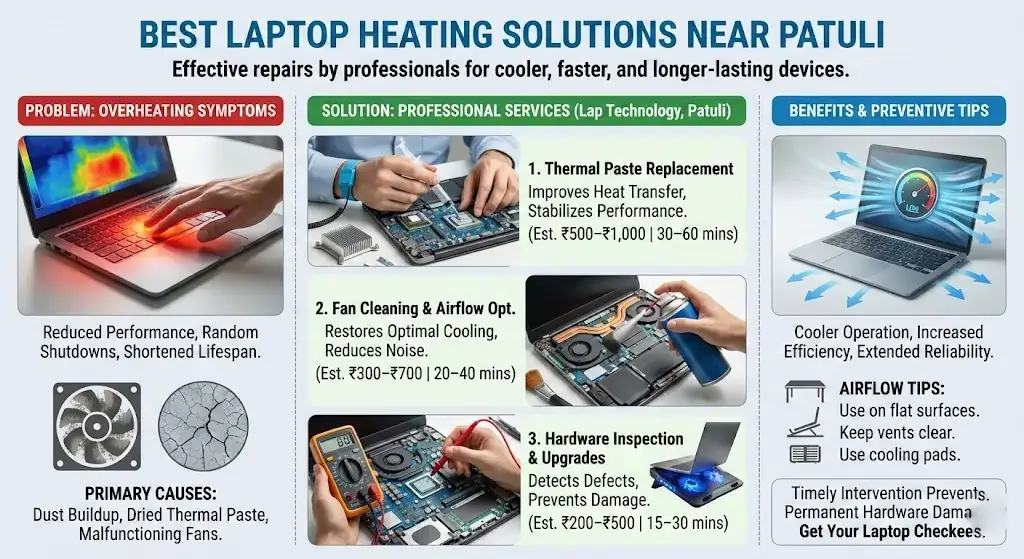
Laptop heating issues can slow performance, trigger random shutdowns, and shorten device lifespan. Professional solutions near Patuli, like Lap Technology, address overheating with thermal paste replacement, fan cleaning, and hardware inspection. Timely maintenance ensures laptops run cooler, quieter, and more reliably, extending performance and preventing long-term damage.Here’s how laptops near Patuli can stay cool and efficient with expert care.
How can laptop heating issues be permanently solved?
Laptop heating happens due to dust, dried thermal paste, or failing fans. Permanent solutions include replacing thermal paste, cleaning fans, improving airflow, and inspecting internal hardware. Regular maintenance prevents overheating, stabilizes performance, and prolongs device lifespan, keeping laptops reliable for daily use and heavy workloads.
Best Laptop Heating Solution Near Patuli
Thermal Paste Replacement
What is Thermal Paste Replacement?
Thermal paste replacement is a key service for laptops near Patuli. It involves removing old, dried thermal compound between the CPU/GPU and the heat sink and applying fresh thermal paste. This improves heat transfer, reduces overheating, and ensures smooth performance. Lap Technology, located near Shahid Khudiram metro station, performs precise applications for all laptop models.
Benefits of Thermal Paste Replacement
Replacing thermal paste lowers laptop temperatures, prevents sudden shutdowns, extends hardware lifespan, and improves fan efficiency. It is a cost-effective, reliable way to maintain laptop health and prevent performance drops.
Fan Cleaning and Airflow Optimization
Internal Fan Servicing
Fans often accumulate dust, reducing airflow and causing heating issues. Our technicians clean fans, vents, and heat sinks carefully, restoring optimal cooling. Clean fans reduce noise, increase fan efficiency, and stabilize laptop performance for daily tasks.
Airflow Management Tips
Using laptops on flat surfaces, keeping vents clear, and employing cooling pads can significantly improve airflow. Lap Technology provides tailored guidance for each laptop, ensuring overheating doesn’t return.
Hardware Inspection and Upgrades
Component Check
Overheating sometimes stems from failing components. Lap Technology inspects motherboards, batteries, and heat sinks to identify issues. Replacing faulty components prevents permanent damage and keeps laptops running safely.
Cooling Upgrades
For laptops prone to heat, external cooling pads or upgraded fans can make a noticeable difference. Our experts recommend solutions compatible with your device to maximize cooling efficiency.
Mobile Responsive Service Table
| Service | Estimated Cost | Benefits | Time Required |
|---|---|---|---|
| Thermal Paste Replacement | ₹500–₹1,000 | Lower temperature, improved performance | 30–60 min |
| Fan Cleaning | ₹300–₹700 | Quieter operation, better airflow | 20–40 min |
| Hardware Inspection | ₹200–₹500 | Identify causes, prevent damage | 15–30 min |
| Cooling Pad Recommendation | ₹400–₹1,200 | Enhanced heat dissipation, longer lifespan | Instant |
How often should thermal paste be replaced?
Thermal paste should be replaced every 2–3 years or when laptops start overheating. Signs include frequent fan noise and random shutdowns.
Can cleaning the fan solve all heating problems?
Fan cleaning helps but may not fully solve issues if thermal paste is old or hardware components are failing. Both steps are needed for permanent relief.
Is overheating dangerous for laptops?
Yes, prolonged overheating can damage CPUs, GPUs, and batteries, reducing overall lifespan and causing sudden failures.
Do cooling pads really work?
Yes, cooling pads improve airflow and reduce surface temperature, complementing internal maintenance for best results.
Where is Lap Technology located?
Lap Technology is near Shahid Khudiram metro station, Garia Station Road, Kolkata, providing expert laptop repair and accessory services.
Which laptops benefit most from thermal paste replacement?
Older laptops, high-performance models, and devices used for heavy workloads benefit the most. Fresh thermal paste restores heat transfer and consistent performance.