Laptop Repair Checklist Before Service
13 Feb 2026, 10:24 PM IST
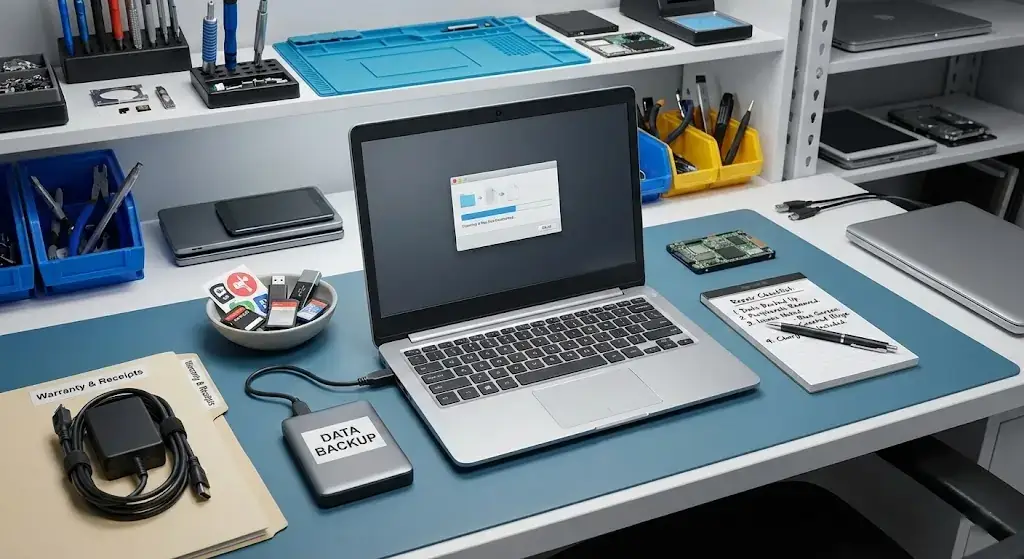
Laptop repair checklist before service is essential to make sure your device is handled safely and efficiently. Proper laptop service preparation prevents data loss, hardware damage, and unnecessary delays. Backing up files, noting down issues, removing accessories, and including chargers are critical steps. Following this checklist ensures that technicians at Lap Technology, near Shahid Khudiram metro station, Garia, can repair your laptop smoothly and reduce risks.
Preparing a laptop for repair doesn’t have to be stressful if you follow simple steps that protect your data and speed up the repair process.
What should I do before giving my laptop for repair?
Before handing over your laptop for repair, it is important to secure data, remove personal items, and clearly note the issues. Laptop service preparation also includes gathering accessories, chargers, and warranty papers. These steps make repairs faster, avoid miscommunication, and ensure your laptop is returned in proper working condition.
Backup Your Data
Why Backup is Crucial
Backing up important files, documents, and media is the first step in a laptop repair checklist before service. Unexpected data loss can happen even in professional repair centers. Using cloud services or external drives ensures that your work, photos, and personal information remain safe. Laptop service preparation always starts with a secure backup.
How to Backup Properly
Use external hard drives, USB drives, or cloud storage like Google Drive, OneDrive, or Dropbox. Double-check that all essential files are copied. Laptop repair checklist before service often fails if backups are overlooked, so this step is non-negotiable.
Remove Personal Items
Detach Accessories
Remove USB drives, memory cards, or any peripherals. Any external item left in the laptop can get lost or damaged during repair. This step makes laptop service preparation smoother and prevents unnecessary complications.
Passwords and Accounts
Write down passwords or temporarily disable login security. Technicians need access to test your laptop fully. Laptop repair checklist before service is incomplete without noting these details.
Note Down Issues
List Problems Clearly
Identify performance issues, error messages, or unusual noises. Being specific helps technicians diagnose problems faster and reduces guesswork. Laptop service preparation improves when issues are communicated clearly.
Check for Visible Damage
Screen cracks, dents, or loose hinges should be documented. Laptop repair checklist before service ensures no damage goes unreported, which prevents disputes later.
Prepare Laptop Accessories
Include Chargers and Cables
Bring the original charger, any essential cables, and peripheral accessories. This step allows testing after repair to confirm the laptop works correctly.
Warranty Papers and Receipts
If available, provide warranty documents and purchase receipts. Lap Technology can offer better service estimates and faster repairs when these are included.
Laptop Repair Preparation Table
| Checklist Step | Action | Benefit |
|---|---|---|
| Backup Data | Copy files to external drive or cloud | Protects personal and work files |
| Remove Personal Items | Detach USBs, SD cards, note passwords | Prevents loss or damage |
| Note Down Issues | List errors and visible damage | Speeds up diagnosis |
| Prepare Accessories | Bring charger, cables, receipts | Ensures testing and accurate estimates |
How long does a laptop repair usually take?
Repair time varies depending on hardware or software issues. Simple fixes can be done in hours, while major repairs may take 1–3 days.
Do I really need to backup data?
Yes, backing up files is critical. Laptop service preparation always starts with protecting your data to avoid permanent loss.
Should I remove passwords from my laptop?
Temporarily disabling passwords or noting them down allows technicians to test the laptop without issues.
Which accessories should I include?
Bring your charger, essential cables, and any peripheral drives needed for testing. Include receipts or warranty papers if available.
Can I leave stickers on the laptop?
It’s better to remove stickers that may interfere with openings or hardware. This is part of proper laptop repair checklist before service.