
Laptop Repair vs Replacement
23 Jun 2026, 5:30 AM IST
Choosing between fixing an existing device and buying a new one is confusing for many users in Kolkata. This laptop repair vs replacement guide kolkata explains how to decide wisely based on cost, performance, age, and usage. At Lap Technology near Shahid Khudiram metro station, Garia station road, Kolkata, we help users evaluate whether repair or replace laptop decisions truly make sense for their daily needs, not marketing hype. A thoughtful choice saves money, protects data, and avoids unnecessary stress.
Why this decision matters more than ever
Laptops are no longer short-term devices. Many users rely on them for work, study, and business. A wrong decision can mean wasted money or lost productivity. The laptop repair vs replacement guide kolkata focuses on value over emotion. Repair or replace laptop choices should depend on facts, not frustration.Should you repair or replace laptop?
Most laptops fail due to heat, storage issues, battery wear, or minor hardware faults. These problems look serious but are often affordable to fix. Replacement becomes sensible only when the laptop cannot meet modern software needs or repair costs climb too high. At Lap Technology, we inspect first, explain second, and let users decide with clarity.Understanding the laptop repair vs replacement guide kolkata
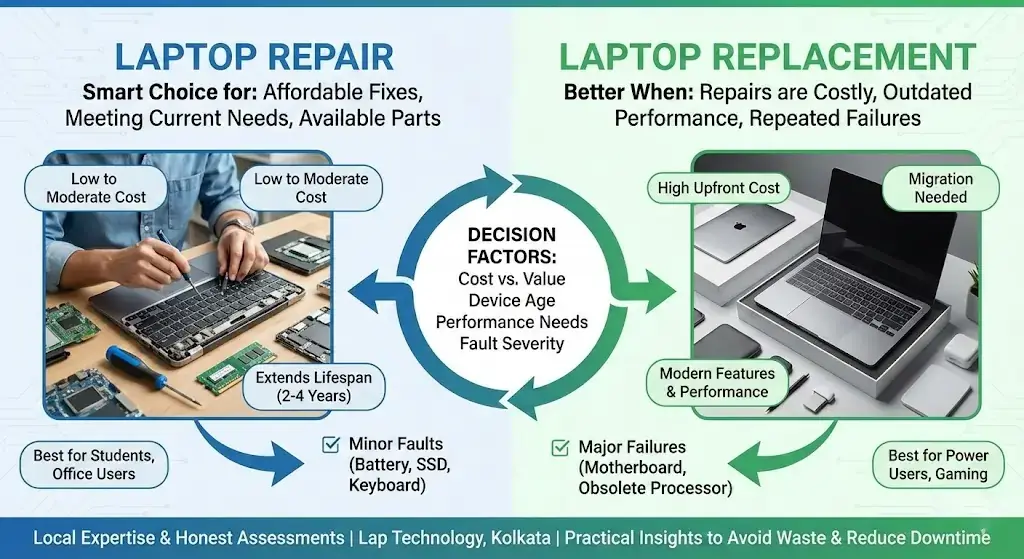
When repair is the smarter move Repair is ideal when the laptop is less than five years old, performance is acceptable, and issues are isolated. Common repairs include SSD upgrades, thermal paste replacement, fan cleaning, battery change, keyboard repair, and charging port fixes. These solutions often restore speed and stability. For many users, repair or replace laptop decisions tilt toward repair once they see the actual cost-benefit. When replacement makes more sense Replacement is better when the motherboard is damaged, the processor is outdated, or the system no longer supports required software. If repair costs exceed half the price of a new laptop, replacement deserves consideration. The laptop repair vs replacement guide kolkata highlights this threshold to prevent overspending.Cost, performance, and lifespan explained
A repaired laptop can easily deliver two to four more years of reliable use. Performance gains from SSD and RAM upgrades surprise many users. Replacement offers new features but also higher cost and setup time. Repair or replace laptop decisions should account for hidden costs like data transfer, software setup, and accessories.Comparison table: repair vs replacement
| Factor | Laptop Repair | Laptop Replacement |
|---|---|---|
| Average cost | Low to moderate | High upfront |
| Time required | Same day to 2 days | Immediate purchase |
| Data safety | Existing data retained | Data migration needed |
| Environmental impact | Eco-friendly | Higher e-waste |
| Best for | Students, office users | High-end gaming, heavy design |
How Lap Technology helps users decide
Located near Shahid Khudiram metro station on Garia station road, Kolkata, Lap Technology provides honest diagnostics. We do not push repairs or replacements blindly. Our laptop repair vs replacement guide kolkata is applied during inspection. We explain repair or replace laptop outcomes in plain language. Accessories selling, such as SSDs, RAM, chargers, and batteries, allows upgrades that delay replacement.Real-world factors users often ignore
Many users underestimate how dust buildup, dried thermal paste, or slow hard drives affect performance. These issues feel like system failure but are fixable. The laptop repair vs replacement guide kolkata brings these lived realities into focus. Repair or replace laptop decisions become easier when users see before-and-after results.Benefits of choosing repair first
Repair keeps familiar systems running. Software remains intact. Learning curves disappear. Costs stay predictable. For small businesses and students, this matters. Replacement can wait when repair delivers stability.FAQ
Is repairing an old laptop worth it?Yes, if the laptop handles daily tasks and repair costs stay reasonable.
How do I know whether to repair or replace laptop?
Compare repair cost with current performance and future needs.
Does repair really improve speed?
SSD and RAM upgrades often deliver dramatic speed improvement.
How long do repairs usually take?
Most common repairs at Lap Technology finish within one to two days.
Can accessories reduce replacement needs?
Quality accessories and upgrades significantly extend laptop lifespan.
Is this laptop repair vs replacement guide kolkata suitable for business users?
Yes, it helps professionals minimize downtime and control expenses.