SSD Upgrade Service for Laptop in Garia
13 Feb 2026, 10:24 PM IST
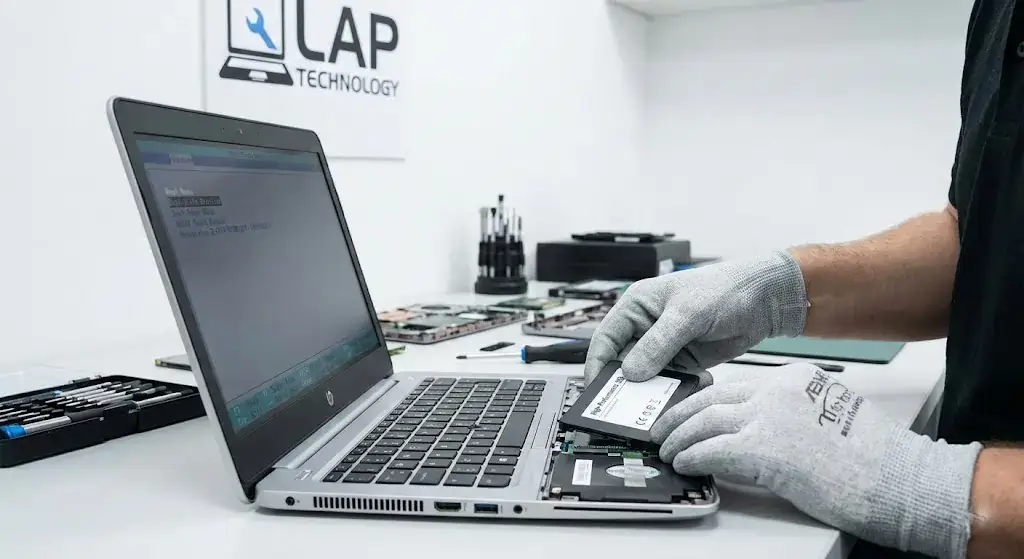
SSD upgrade service for laptops in Garia offers faster boot times, improved multitasking, and reliable storage solutions. Lap Technology, near Shahid Khudiram metro station, provides professional installation and data migration, ensuring laptops run smoothly. Students and professionals can enjoy enhanced performance, extended device lifespan, and secure storage with certified SSDs.Boost your laptop’s speed and efficiency with expert SSD upgrade services in Garia.
Does SSD upgrade improve laptop performance?
Yes, SSD upgrades significantly improve laptop performance. They reduce boot times, speed up application loading, and make multitasking smoother. By replacing traditional hard drives with SSDs, laptops become more responsive, reliable, and energy-efficient, providing a noticeable improvement in daily usage and productivity.
SSD Upgrade Service for Laptop in Garia
Why Choose Lap Technology for SSD Upgrades?
Fast, Efficient, and Local
Lap Technology’s SSD upgrade service for laptop in Garia is designed for quick, hassle-free installations. Laptop speed upgrade Garia specialists ensure careful handling, secure data migration, and optimized setup so users notice immediate performance improvements.
Certified SSDs for All Brands
We offer top-quality SSDs compatible with major laptop brands. Laptop speed upgrade Garia includes SATA and NVMe options, delivering faster read/write speeds, enhanced multitasking, and longer device lifespan. Students, freelancers, and professionals benefit from reliable storage and smooth performance every day.
Benefits of SSD Upgrade
Immediate Performance Boost
With SSD upgrades, laptops boot in seconds and applications launch almost instantly. Laptop speed upgrade Garia ensures a noticeable difference even on older devices. Everyday tasks like browsing, video streaming, or document editing become seamless, eliminating frustrating delays.
Enhanced Data Security and Durability
SSDs are less prone to mechanical failure than traditional HDDs. Laptop speed upgrade Garia protects important files, reducing the risk of data loss while extending overall device longevity. Users gain peace of mind knowing their laptop is faster and safer.
SSD Upgrade Process
Step-by-Step Installation
The service starts with a full diagnostics check, followed by careful SSD installation and secure data transfer. Laptop speed upgrade Garia also includes performance testing to ensure your system runs at maximum efficiency.
Post-Installation Support
Our team provides guidance on maintenance and optimization. Laptop speed upgrade Garia guarantees ongoing support, helping users get the most out of their upgraded laptops.
SSD Upgrade Service Table
| Service | Price Range | Benefits | Time Required |
|---|---|---|---|
| 256GB SSD Upgrade | ₹2,500–₹3,000 | Faster boot, quick app loading | 1–2 hours |
| 512GB SSD Upgrade | ₹4,000–₹4,500 | Larger storage, improved multitasking | 2–3 hours |
| 1TB SSD Upgrade | ₹7,000–₹8,000 | High performance, long-term reliability | 3–4 hours |
How long does an SSD upgrade take?
Most SSD upgrades at Lap Technology take between 1–4 hours depending on storage size and data migration needs.
Will my data be safe during the upgrade?
Yes, our laptop speed upgrade Garia service includes secure data transfer, so users don’t lose files during the upgrade.
Can my laptop support an SSD upgrade?
Most modern laptops support SATA or NVMe SSDs. Specialists at Lap Technology check compatibility before starting the service.
Does SSD upgrade improve battery life?
Yes, SSDs use less power than traditional hard drives, slightly improving battery performance and reducing heat.
Is there a warranty on the SSD upgrade?
Lap Technology provides warranty coverage for both the SSD hardware and the installation service.
Can I choose the SSD brand?
Yes, we offer trusted brands such as Samsung, WD, and Crucial, so users can select based on performance and budget preferences.
Do you offer support after the upgrade?
Absolutely. Our team guides users on maintenance, troubleshooting, and performance optimization post-upgrade.